6
9
2026
5

通过字幕总结YouTube视频内容

现在YouTube首页的视频推荐越来越差了,好多标题党、clickbait,故意把讨论的主题藏起来。经常我点进去看了好久,才发现原来并没有讨论什么我之前不知道信息,又或者讨论的话题我完全不感兴趣。再不就是把我想知道的信息藏到不知道哪个片段里。虽然我有GlobalSpeed扩展可以依内容信息密度来方便地调整播放速度,但是调太快(超过2x)就听不清啦。总之是好多视频点开看之前十分吸引人,但看完或者看一半时就想骂人、点踩退出,十分浪费时间。

正好最近在尝试Gemini API,于是灵光一现,写了个脚本,使用yt-dlp下载视频字幕,然后调用Gemini API来总结内容。

#!/usr/bin/python3

import sys
import json
import subprocess
import tempfile
from pathlib import Path

import httpx

GEMINI_KEY = 'YOUR GEMINI KEY HERE'
URL = 'https://generativelanguage.googleapis.com/v1beta/models/gemini-3.1-flash-lite:streamGenerateContent?alt=sse'
PROMPT = '根据以下字幕文本总结视频内容。总结结果中请不要包含任何赞助商推广信息。'

def main(url, sublang):
  with tempfile.TemporaryDirectory() as d:
    subprocess.run([
      'yt-dlp', '--sub-langs', sublang, '--write-subs', '--write-auto-subs', '--skip-download',
      url,
    ],
      cwd=d,
      check=True,
    )

    p = Path(d)
    try:
      file = tuple(p.iterdir())[0]
    except IndexError:
      sys.exit('No subtitles.')

    for _ in range(2):
      try:
        do_request(file)
        break
      except httpx.ReadError as e:
        print(e, file=sys.stderr)

def do_request(filepath):
  client = httpx.Client(http2=True)
  filename = filepath.name
  with filepath.open() as f:
    subtitles = f.read()

  parts = [{
    'text': PROMPT,
  }, {
    'text': f'文件名:{filename}\n文件内容:\n{subtitles}',
  }]

  j = {
    'contents': [{
      'parts': parts
    }],
  }
  with client.stream(
    'POST', URL,
    headers = {
      "X-goog-api-key": GEMINI_KEY,
      "Content-Type": "application/json",
    },
    json=j, timeout=120,
  ) as r:
    for line in r.iter_lines():
      if not line.startswith('data: '):
        continue

      line = line.removeprefix('data: ')

      data = json.loads(line)
      for a in data['candidates']:
        for b in a['content']['parts']:
          text = b['text']
          if not text:
            break
          print(text, end='', flush=True)

  print()

if __name__ == '__main__':
  import argparse

  parser = argparse.ArgumentParser()
  parser.add_argument('URL',
                      help='YouTube URL')
  parser.add_argument('--lang', default='en',
                      help='choose subtitles language')
  args = parser.parse_args()

  main(args.URL, args.lang)

脚本依赖Python和httpx库。当然鉴于httpx已经不再更新,你换成httpx2应该也能用。Gemini Key可以去这里生成,然后填到脚本开头。我使用的是gemini-3.1-flash-lite这个模型,因为免费版本中,它的每日请求数配额比较充足。

当然啦,视频要有CC字幕这个脚本才能用,否则会报错。默认使用英文字幕,包含自动生成的版本。如果是中文视频,可以使用--lang zh参数指定用中文字幕。

Category: 网络 | Tags: YouTube LLM Python google
6
17
2014
3

Google IP 可用性检测脚本

需要 Python 3.4+,一个参数用来选择测试搜索服务还是 GAE 服务。测试 GAE 服务的话需要先修改开头的两个变量。从标准输入读取 IP 地址或者 IP 段(形如 192.168.0.0/16)列表,每行一个。可用 IP 输出到标准输出。实时测试结果输出到标准错误。50 线程并发。

#!/usr/bin/env python3

import sys
from ipaddress import IPv4Network
import http.client as client
from concurrent.futures import ThreadPoolExecutor
import argparse
import ssl
import socket

# 先按自己的情况修改以下几行
APP_ID = 'your_id_here'
APP_PATH = '/fetch.py'

context = ssl.SSLContext(ssl.PROTOCOL_TLSv1)
context.verify_mode = ssl.CERT_REQUIRED
context.load_verify_locations('/etc/ssl/certs/ca-certificates.crt')

class HTTPSConnection(client.HTTPSConnection):
  def __init__(self, *args, hostname=None, **kwargs):
    self._hostname = hostname
    super().__init__(*args, **kwargs)

  def connect(self):
    super(client.HTTPSConnection, self).connect()

    if self._tunnel_host:
      server_hostname = self._tunnel_host
    else:
      server_hostname = self._hostname or self.host
      sni_hostname = server_hostname if ssl.HAS_SNI else None

    self.sock = self._context.wrap_socket(self.sock,
                                          server_hostname=sni_hostname)
    if not self._context.check_hostname and self._check_hostname:
      try:
        ssl.match_hostname(self.sock.getpeercert(), server_hostname)
      except Exception:
        self.sock.shutdown(socket.SHUT_RDWR)
        self.sock.close()
        raise

def check_ip_p(ip, func):
  if func(ip):
    print(ip, flush=True)

def check_for_gae(ip):
  return _check(APP_ID + '.appspot.com', APP_PATH, ip)

def check_for_search(ip):
  return _check('www.google.com', '/', ip)

def _check(host, path, ip):
  for chance in range(1,-1,-1):
    try:
      conn = HTTPSConnection(
        ip, timeout = 5,
        context = context,
        hostname = host,
      )
      conn.request('GET', path, headers = {
        'Host': host,
      })
      response = conn.getresponse()
      if response.status < 400:
        print('GOOD:', ip, file=sys.stderr)
      else:
        raise Exception('HTTP Error %s %s' % (
          response.status, response.reason))
      return True
    except KeyboardInterrupt:
      raise
    except Exception as e:
      if isinstance(e, ssl.CertificateError):
        print('WARN: %s is not Google\'s!' % ip, file=sys.stderr)
        chance = 0
      if chance == 0:
        print('BAD :', ip, e, file=sys.stderr)
        return False
      else:
        print('RE  :', ip, e, file=sys.stderr)

def main():
  parser = argparse.ArgumentParser(description='Check Google IPs')
  parser.add_argument('service', choices=['search', 'gae'],
                      help='service to check')
  args = parser.parse_args()
  func = globals()['check_for_' + args.service]

  count = 0
  with ThreadPoolExecutor(max_workers=50) as executor:
    for l in sys.stdin:
      l = l.strip()
      if '/' in l:
        for ip in IPv4Network(l).hosts():
          executor.submit(check_ip_p, str(ip), func)
          count += 1
      else:
        executor.submit(check_ip_p, l, func)
        count += 1
  print('%d IP checked.' % count)

if __name__ == '__main__':
  main()

脚本下载地址


2014年9月3日重要更新:由于失误,之前的脚本没有检查 SSL/TLS 证书,所以将错误的 IP 认为是可用的。现已更新。

Category: python | Tags: python google 网络 中国特色
11
13
2013
2

GM 脚本:清除 Google Groups 中的翻译提示

终于忍受不了 Google Groups 网页里到处都是的「将本帖翻译成中文」提示了——

// ==UserScript==
// @name           Google Group 清理
// @namespace      http://lilydjwg.is-programmer.com/
// @description    不用将帖子翻译成中文……
// @include        https://groups.google.com/*
// @grant      none
// ==/UserScript==

function doit() {
  console.log('cleaning up...');
  var divs = document.evaluate('//div[@class="gux-confirm-panel-c"]/div/a[@class="GFLL15SM5B"]/parent::div/parent::div', document, null, XPathResult.UNORDERED_NODE_SNAPSHOT_TYPE, null);

  for(var i=0, len=divs.snapshotLength; i<len; i++){
    var div = divs.snapshotItem(i);
    div.parentNode.removeChild(div);
  }
}

var timer;

document.body.addEventListener('overflow', function(e){
  if(timer){
    clearTimeout(timer);
  }
  timer = setTimeout(doit, 500, false);
});

点击安装备用地址

Category: 火狐 | Tags: google 火狐 GreaseMonkey
11
26
2011
8

给博客加入 Google +1 按钮

本来我是懒得去做这种东西的,可鉴于以下几个原因,还是弄了一个。

  • Mike 也 +1 了
  • 代码很简单
  • 方便分享到 Google Plus
  • 反正从国内访问本博客也不容易,就不在乎这个 +1 按钮很可能出不来了

代码如下,真的很简单:

<script type="text/javascript" src="https://apis.google.com/js/plusone.js">{lang: 'zh-CN'}</script>
<g:plusone></g:plusone>

我把它加到了每篇文章的末尾,因为我不认为没看完文章的读者会需要用到它。看不到按钮的读者请自行解决对 Google HTTPS 的访问问题。

Category: 未分类 | Tags: Google
8
8
2011
9

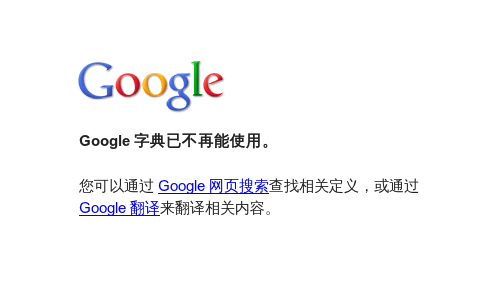
再见了,Google 字典!

今天,当我又遇到一个不太认识的单词时,我像往常那样选中它,然后切换到火狐标签栏的第一个已固定的标签页,正准备连续在输入框点击左键和中键来查询的时候,蓦然发现,Google 字典不告而别了——

Google Dictionary Are Gone

曾经有一次,Google 字典变成了 Google 搜索。当时我就很失落——这么好用的一个工具没了。第二天一看,它又回来了。我以为是用户的反对使 Google 反悔了。可是现在,即使明天它再回来,我也不敢再信任了。已经开了好几个月的固定标签页关掉吧,删除相关书签和搜索关键字。下个星期再去删未完成的抓取 Google 字典的 Python 脚本。至于那个我自己修改过的 GreaseMonkey 脚本,算了吧,留着作为纪念好了。

Category: 网络 | Tags: google 词典
7
1
2011
10

GM 脚本:Google顶栏还是白色的好看

月光都说了,Google的大多数页面还是白色顶栏比较合适,黑的看着实在是不爽。所以还是改回来好了:

// ==UserScript==
// @name          White Google topbar
// @namespace     http://lilydjwg.is-programmer.com/
// @description	  bring back google's white topbar
// @include       http://*.google.com*
// @include       https://*.google.com*
// ==/UserScript==

var css = "#gbx3, #gbx4 { background-color: #ffffff; border-bottom: 1px solid #3366cc; } #gbz .gbzt, #gbz .gbgt, #gbg .gbgt, .gbts, .gbz0l { color: #3366cc !important; } .gbzt-hvr, .gbzt:focus, .gbgt-hvr, .gbgt:focus { background-color: #eff3fb; } .gbz0l .gbtb2 { border-top-color: #3d7af5 !important; } #gbi5 { background-position: -6px -22px; }";
if (typeof GM_addStyle != "undefined") {
  GM_addStyle(css);
} else if (typeof PRO_addStyle != "undefined") {
  PRO_addStyle(css);
} else if (typeof addStyle != "undefined") {
  addStyle(css);
} else {
  var heads = document.getElementsByTagName("head");
  if (heads.length > 0) {
    var node = document.createElement("style");
    node.type = "text/css";
    node.appendChild(document.createTextNode(css));
    heads[0].appendChild(node); 
  }
}

点击安装

Category: 火狐 | Tags: google GreaseMonkey
4
12
2011
8

Google 字典大降级

2011年4月13日更新:

今天Google字典又回来了。而且我确认过了,昨天不是4月1日。Google这是技术故障?

2011年8月8日更新:

今天,Google 字典再一次消失了。。。


今天打开火狐时惊讶地发现,我一直打开着的“Google字典”标签被一个搜索“字典”的Google搜索页替换了。又看到书签工具栏上少了几项,我以为这也是火狐的bug,重启之,书签工具栏正常了,但还是没有Google字典。使用“关键字搜索”打开一个新网页,看到 URL 从https://www.google.com/dictionary跳转走,才知道坏了。

是的,Google 字典已经降级为Google搜索了!cnbeta也有报道。Google搜索有查字典的功能这我是早就知道了的,但是我觉得并不好用。不过查一个不认识的词嘛,有必要开个标签进行一次完整的搜索么?Google字典我之前也不用,因为“清除之前的输入(这会覆盖选择区的内容)-> Ctrl-V 或者如果没Ctrl-C过就回到原网页选中单词再回来中键粘贴 -> 点击搜索或者按回车键”这个流程太麻烦了,这通常需要2次键鼠切换、4次按键、1次鼠标点击。而使用关键字搜索每次都得打前缀,然后中键粘贴,然后按回车,鼠标键盘切换好几次也很是不方便,所以我一直使用的是Dict.CN或者是后来因为Dict.CN速度变得太慢而改用的沪江词典的划词小书签,虽然每次用的时候还得点个书签,然后等待会儿,但还是比较方便的。

后来看到这个Super Google Dictionary 2 GreaseMonkey脚本,经过自己的修改,让查词便捷了很多:选中要查的词 -> 转到Google字典标签 -> 在输入框点击左键清除之前的输入 -> 点击中键粘贴要查的词,稍等片刻,结果就出来了。总共三次鼠标点击

一直觉得这样是除了写(或者装)火狐插件之外可能的最快捷的查在线词典的办法了,可是今天,Google字典降级,Google 在 Chrome 浏览器之后再一次用行动证明他们某些设计的脑残。(关于 Chrome 浏览器的脑残之处我有时间整理好了再写。)

Category: 网络 | Tags: google 词典
11
21
2010
0

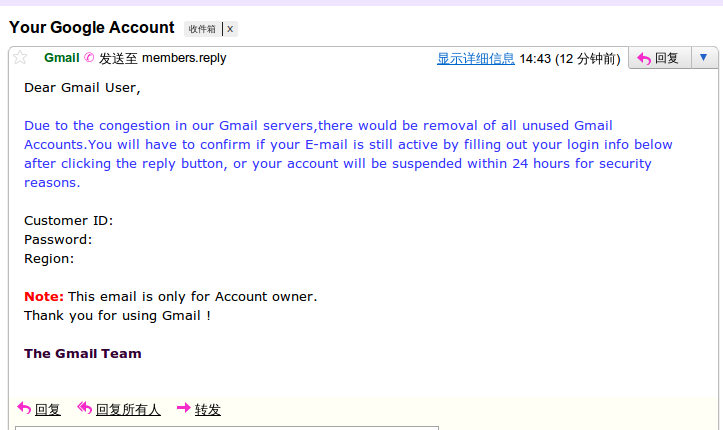
Your Google Account

Gmail 钓鱼邮件

今收到的一个失败的钓鱼邮件。

PS:为什么Gmail没有提示此邮件可能存在欺诈什么的呢?

Category: 网络 | Tags: 安全 google
5
23
2010
1

Google开始支持https,遂更新火狐若干选项

 今天Google开始支持https了,所以我也应该做出改变了。

更改搜索引擎

我安装了Organize Search Engines,所以这是很简单的事,只要打开“搜索引擎选项”更改其属性就是了。如果没有安装类似插件,也可以手动更改。是一个XML文件,Linux下在/usr/lib/firefox-addons/searchplugins下找,Windows下在安装文件夹下的searchplugins下找。

更改地址栏搜索使用的搜索引擎

火狐的智能地址栏很强大,在地址栏直接输入关键字时,可能会跳转到相关网站上,也可能使用Google搜索。其实都是使用的谷歌(google.cn)。这个也应该给改了。

打开about:config页面,搜索keyword.URL,然后改掉就可以了。

Category: 火狐 | Tags: 火狐 google

Mastodon | Theme: Aeros 2.0 by TheBuckmaker.com